

Download CCleaner Browser – Secure, Fast & Privacy‑Focused Web Browser
CCleaner Browser, created by Piriform Ltd., is a lightweight, Chromium‑based web browser that puts privacy and security at the forefront of everyday browsing. Designed for Windows 10/11 users who want a hassle‑free experience, the browser integrates an ad‑blocking engine, anti‑phishing safeguards, HTTPS‑only connections, and a robust “Security and Privacy Center” that lets you fine‑tune every protection layer. Unlike mainstream browsers that constantly feed user data to advertising networks, CCleaner Browser isolates your digital footprint, blocks fingerprinting scripts, and even offers a Webcam Guard to control camera access.
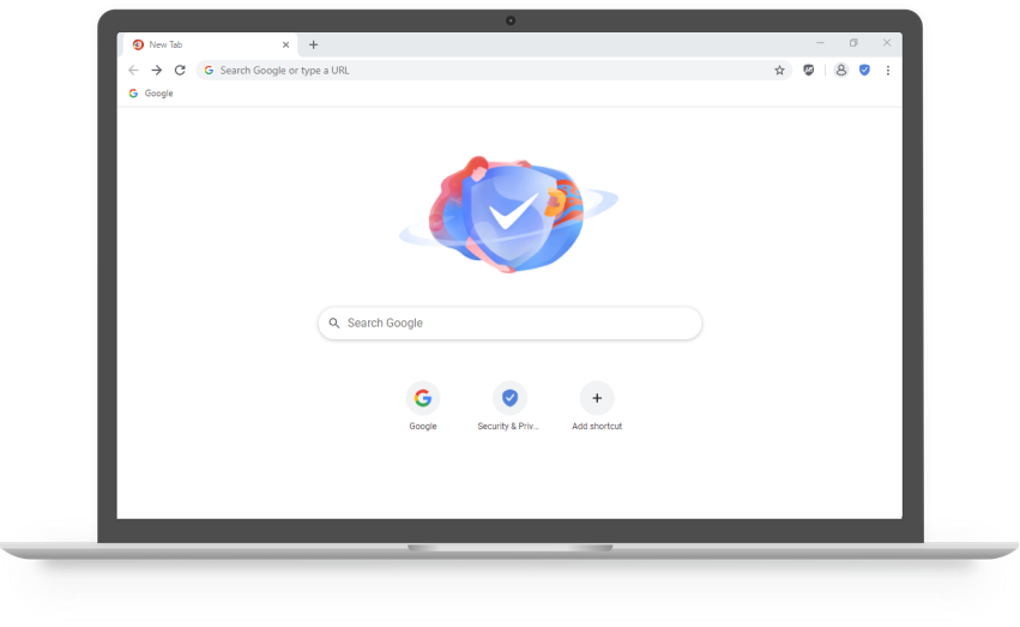
The interface mirrors the familiar Chrome layout, which shortens the learning curve, while the underlying technology is stripped of bloat, resulting in faster page loads and lower memory consumption. Whether you are a casual surfer, a remote worker handling sensitive documents, or a privacy‑conscious gamer, the browser delivers a seamless blend of speed, simplicity, and strong data protection. Its built‑in cache cleaner, history scrubber, and “Stealth Mode” (an enhanced incognito experience) ensure that traces of your online activity disappear the moment you close a tab.
In short, CCleaner Browser is a free, secure alternative that lets you browse the internet without worrying about trackers, malicious sites, or unwanted ads.
Core Features & Privacy Toolbox
- Integrated ad‑blocker that removes intrusive ads and reduces page‑load time.
- Anti‑phishing engine that warns or blocks known malicious websites.
- HTTPS‑only mode forces encrypted connections whenever possible.
- Anti‑tracking & anti‑fingerprinting technology that masks your browser profile.
- Webcam Guard – control which sites can access your camera.
- Built‑in password manager for secure auto‑fill and storage.
- Stealth Mode – enhanced private browsing that clears history, cookies, and temporary files on exit.
- Cache & history cleaner that frees disk space and protects privacy with one click.
- Video downloader for offline viewing of supported media.
- Customizable security rules via the Advanced Settings panel.
The heart of CCleaner Browser lies in its “Security and Privacy Center,” a centralized dashboard that explains each feature in plain language and lets you toggle protections with a single click. For example, the anti‑fingerprinting module rewrites HTTP headers and masks canvas data, making it extremely difficult for advertisers to build a unique profile based on your browsing habits. The ad‑blocker isn’t a simple blacklist; it supports community‑maintained filter lists and lets you create your own custom rules, giving power users fine‑grained control over what content is allowed.
HTTPS‑only mode automatically upgrades HTTP requests to secure HTTPS, protecting credentials from eavesdropping on public Wi‑Fi. The integrated password manager stores encrypted login details locally, so you never need to rely on third‑party cloud services. All these tools work together to create a layered defense that keeps your data out of the hands of trackers, hackers, and data brokers while maintaining a smooth, responsive browsing experience.
Installation, First‑Time Configuration & Daily Workflow
Getting started with CCleaner Browser is intentionally straightforward. After you download the installer, launch the executable and follow a three‑step wizard. The first screen lets you select your preferred language; the second offers to import bookmarks, passwords, and extensions from any existing browser (Chrome, Edge, Firefox, etc.), ensuring a seamless transition. The installer also creates a desktop shortcut and pins an icon to the taskbar for quick access. The entire process typically finishes in under 30 seconds on a modern PC.
Once the browser opens, a brief “Welcome” tour introduces the Security and Privacy Center. Here you can enable Stealth Mode, activate the built‑in ad‑blocker, and turn on HTTPS‑only browsing with a single toggle. The first‑time setup wizard automatically enables the most critical protections—anti‑phishing, anti‑tracking, and HTTPS enforcement—so you’re safe out of the box. For users who prefer granular control, the Advanced Settings section lets you import third‑party filter lists, adjust fingerprinting parameters, or disable specific modules.
Daily use mirrors any Chromium‑based browser: you can pin tabs, manage extensions from the Chrome Web Store, and use the familiar address bar for searches. The built‑in cache cleaner is accessible via a toolbar button; clicking it removes temporary files, cookies, and history with one action, freeing up disk space and reinforcing privacy. The Webcam Guard icon appears in the top‑right corner whenever a site attempts to access your camera, giving you an instant allow/deny decision. Overall, the workflow is designed to require minimal manual tweaking while still offering depth for power users.
Compatibility, Pros & Cons, and Frequently Asked Questions
CCleaner Browser is currently available for Windows 10 and Windows 11 (both 64‑bit). The installer detects the appropriate system architecture automatically and does not support macOS, Linux, Android, or iOS at this time. Because it is built on the Chromium engine, it inherits the same web‑standard compatibility as Chrome, meaning virtually every modern website renders correctly. The lightweight footprint (under 150 MB on disk) ensures that even older PCs with 4 GB RAM can run the browser without noticeable slowdown.
Pros
- Free and lightweight – minimal impact on system resources.
- Robust privacy suite (ad‑blocker, anti‑tracking, anti‑fingerprinting).
- Built‑in HTTPS‑only mode and anti‑phishing protection.
- Easy migration from existing browsers with data import.
- Stealth Mode clears all traces of browsing on exit.
Cons
- Only available for Windows; no macOS, Linux, or mobile versions.
- Limited extension ecosystem compared to Chrome’s full Web Store (some extensions may conflict with built‑in ad‑blocker).
- Advanced settings can be overwhelming for absolute beginners.
- Occasional incompatibility with very old or heavily scripted sites that rely on Flash (which is blocked by default).
Frequently Asked Questions
Is CCleaner Browser really free?
Yes, the browser is completely free for personal use. There are no hidden fees, subscription plans, or paid upgrades.
How does Stealth Mode differ from Chrome’s Incognito?
Stealth Mode not only prevents history, cookies, and cache from being saved, but it also disables all tracking scripts and enforces HTTPS‑only connections by default, offering an extra layer of privacy.
Can I use my existing Chrome extensions?
Most Chrome extensions work out of the box, but some that rely on ad‑delivery or tracking may be blocked by the built‑in ad‑blocker. You can whitelist specific extensions in the Advanced Settings if needed.
Is my data stored in the cloud?
No. All passwords, browsing data, and settings are stored locally on your PC in encrypted form. The browser does not sync data to external servers unless you enable a third‑party cloud sync extension.
How often is the browser updated?
Piriform releases security and feature updates roughly every 4–6 weeks, and the built‑in updater notifies you automatically when a new version is available.
Our Verdict
After extensive testing on a variety of Windows machines, CCleaner Browser proved to be a reliable, privacy‑centric alternative to mainstream browsers. Its blend of built‑in ad‑blocking, HTTPS‑only browsing, and anti‑fingerprinting delivers a smoother, safer experience without the need for multiple third‑party extensions. While the lack of macOS and mobile support limits its audience, Windows users looking for a lightweight, secure browser will find it an excellent fit. The occasional learning curve for advanced settings is outweighed by the strong default protections that keep everyday users safe out of the box.
Conclusion – Why You Should Download CCleaner Browser Today
If you value speed, simplicity, and a privacy shield that works without constant manual tweaking, CCleaner Browser is ready for immediate download. Its free price tag, lightweight footprint, and comprehensive security suite make it a compelling choice for anyone who wants to browse the web without being tracked or bombarded by ads. The built‑in cleaning tools keep your PC tidy, while Stealth Mode guarantees that your browsing sessions leave no trace. Because it’s based on Chromium, you’ll enjoy full compatibility with modern web standards and the ability to use most Chrome extensions when needed.
Don’t let advertisers and malicious sites dictate how you use the internet. Click the link below, install the browser in seconds, and start enjoying a faster, safer, and more private browsing experience today.







